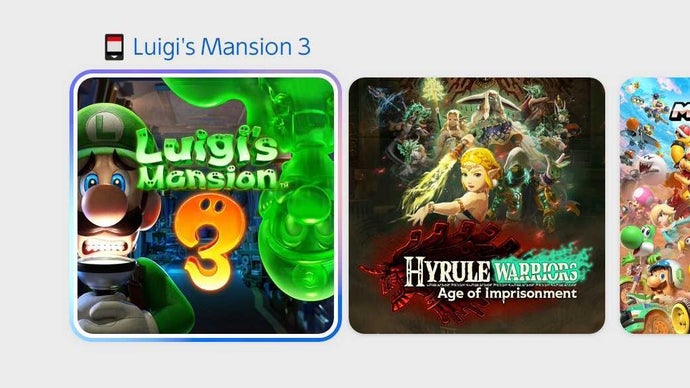
Nintendo Switch Update Finally Differentiates Between Digital and Physical Games
Gaming News is thrilled to report on a long-awaited and incredibly useful update that Nintendo has rolled out across its Switch family of consoles. This seemingly small, yet profoundly impactful change finally addresses a frustration that has plagued Switch owners since the console’s launch: the clear and immediate distinction between digital and physical games on the home screen. No longer will you have to second-guess whether a game resides on a cartridge or within your console’s memory. This update streamlines the user experience and offers a much more intuitive way to manage your growing Switch library. Let’s dive into the specifics of this update and explore why it’s a significant improvement for Nintendo Switch users.
The Problem: Ambiguity in the Nintendo Switch Game Library
Prior to this update, the Nintendo Switch user interface presented both physical and digital games in a uniform manner on the home screen. Each game was represented by its icon, and unless a user specifically navigated to the System Settings to check the download status or inserted the game cartridge, there was no readily apparent way to tell if a game was installed or required a cartridge to play. This ambiguity often led to several inconveniences:
- Accidental Purchases: Users might inadvertently repurchase a game they already owned digitally, believing they only possessed the physical version.
- Storage Management Issues: Knowing which games are occupying valuable internal storage space is crucial for managing the Switch’s limited memory. The previous interface made it difficult to quickly assess which titles could be archived or deleted to free up space.
- Confusion for Multi-User Systems: On consoles shared by multiple users, the lack of distinction could cause confusion, especially when one user has downloaded a digital game and another attempts to play it without realizing it’s already installed.
- Frustration When Traveling: Players packing their Switch for travel would often have to manually check which cartridges they needed to bring, a process made unnecessarily cumbersome by the lack of visual cues on the home screen.
- Unclear Game Ownership: When reselling, trading, or gifting games, not having clarity on which games are physical versus digital can become problematic.
This seemingly small issue resulted in a significant amount of unnecessary hassle for Nintendo Switch owners, making library management a chore rather than a seamless experience. The new update directly addresses these concerns.
The Solution: A Subtle but Effective Visual Indicator
Nintendo’s latest system software update introduces a subtle, yet effective visual indicator to differentiate between digital and physical games on the Switch home screen. Digital games now display a small, downloadable icon in the lower-right corner of the game’s tile. This icon is discreet enough to not be distracting but clear enough to provide immediate confirmation that the game is a digital download.
- Digital Game Indicator: The digital game icon will only appear on the games that have been downloaded digitally.
With this simple addition, users can instantly discern whether a game requires a cartridge or can be launched directly from the console’s memory. This eliminates the need to delve into system settings or rely on memory to recall purchase methods. The visual indicator streamlines the process of identifying game types, making library management significantly easier and more intuitive.
Benefits of the New Indicator
The benefits of this update extend beyond mere convenience. This visual cue provides users with enhanced control over their game libraries and improves the overall user experience in several key areas:
- Simplified Library Management: Easily identify which games are taking up valuable internal storage, allowing you to archive or delete them to free up space.
- Reduced Purchase Errors: Avoid accidentally repurchasing games you already own digitally, saving you money and unnecessary frustration.
- Clear Ownership Tracking: Easily track which games are associated with your Nintendo Account, making it easier to manage your digital library.
- Improved Multi-User Experience: Ensure that all users on a shared console are aware of which games are digitally owned and can be played without a cartridge.
- Efficient Travel Planning: Quickly identify which game cartridges you need to pack for travel, eliminating the need to manually check each game individually.
- Easier to Give and Sell Games: When selling or trading Switch games, it is a lot easier to confirm whether a game is physical or digital.
This small change significantly enhances the Nintendo Switch user experience, making it easier for players to manage their growing game libraries and avoid common pitfalls associated with the ambiguity of the previous interface.
How to Get the Latest Update
Updating your Nintendo Switch console is a straightforward process. By default, the console is set to automatically download and install system updates when connected to the internet. However, if you want to manually check for updates, follow these steps:
- Go to System Settings: From the Nintendo Switch home menu, select the “System Settings” icon (the gear icon).
- Scroll Down to System: On the left-hand side of the screen, scroll down and select “System.”
- Select System Update: On the right-hand side of the screen, select “System Update.”
The console will then check for available updates. If an update is available, it will be downloaded and installed automatically. Make sure your console is connected to the internet and has sufficient battery life (or is connected to the AC adapter) during the update process.
Once the update is complete, restart your console to ensure that the changes take effect. You should then see the new digital game indicator on your home screen.
Beyond the Indicator: Other Recent Nintendo Switch Updates
While the digital/physical game indicator is the most prominent and immediately noticeable change in this update, Nintendo has also included other improvements and fixes to enhance the overall user experience. These may include:
- General System Stability Improvements: As with most Nintendo Switch updates, this one also includes general system stability improvements to enhance the overall performance and reliability of the console. These improvements help to reduce the risk of crashes and errors, ensuring a smoother gaming experience.
- Minor Bug Fixes: The update also addresses minor bugs and glitches that may have been present in the previous system software. These fixes may not be immediately noticeable, but they contribute to a more polished and refined user experience.
- Improved Network Connectivity: In some cases, system updates may also include improvements to network connectivity, enhancing the stability and speed of online gameplay and downloads.
It’s always a good idea to keep your Nintendo Switch console updated to the latest system software to ensure that you have the best possible gaming experience. Nintendo regularly releases updates to address bugs, improve performance, and add new features.
Community Reaction to the Update
The Nintendo Switch community has reacted overwhelmingly positively to the addition of the digital/physical game indicator. Online forums and social media platforms are filled with praise for Nintendo’s decision to address this long-standing issue.
- Relief and Gratitude: Many users have expressed relief and gratitude that Nintendo has finally implemented a feature that they have been requesting for years.
- Improved User Experience: Players appreciate the simplicity and effectiveness of the visual indicator, noting that it has significantly improved their library management experience.
- Reduced Frustration: The update has been praised for reducing the frustration associated with managing a large game library and avoiding accidental purchases.
- Positive Sentiment: Overall, the community sentiment towards the update is overwhelmingly positive, with many users expressing renewed appreciation for Nintendo’s attention to detail and commitment to improving the user experience.
This update serves as a testament to Nintendo’s willingness to listen to its community and address their concerns. The company’s decision to implement this seemingly small change has had a significant impact on the overall user experience, demonstrating that even minor improvements can make a big difference.
The Future of Nintendo Switch Updates
This update is a welcome addition, and it sparks thoughts about the future of the Nintendo Switch operating system. What other features could be implemented to further enhance the user experience?
- Folders and Organization: Many users would appreciate the ability to create custom folders to organize their games by genre, franchise, or any other criteria.
- Enhanced Search Functionality: Improving the search functionality within the eShop and the game library would make it easier for users to find the games they are looking for.
- Cloud Saves for All Games: Expanding cloud save support to all games, including those that currently lack this feature, would provide greater peace of mind to players.
- Improved Parental Controls: Enhancing parental controls to allow for more granular control over game access and playtime would be beneficial for families.
- Customizable Themes: Allowing users to customize the look and feel of the home screen with custom themes would add a personal touch to the user experience.
Nintendo has consistently demonstrated its commitment to improving the Nintendo Switch user experience through regular system updates. Gaming News anticipates further enhancements and refinements in the future, and we’ll continue to report on any developments.
Conclusion: A Win for Nintendo Switch Owners
Nintendo’s latest system software update, which introduces the digital/physical game indicator, is a significant win for Nintendo Switch owners. This seemingly small change addresses a long-standing frustration and greatly improves the overall user experience. By providing a clear visual cue to differentiate between digital and physical games, Nintendo has made it easier for players to manage their game libraries, avoid accidental purchases, and enjoy their gaming experience without unnecessary hassle. Gaming News applauds Nintendo for listening to its community and implementing this much-needed feature. We encourage all Nintendo Switch owners to update their consoles to the latest system software and experience the benefits of this improved user interface.