Build Your Perfect NAS: From Plug-and-Play Simplicity to Powerful Multi-Drive Systems and Dedicated Video Game Servers
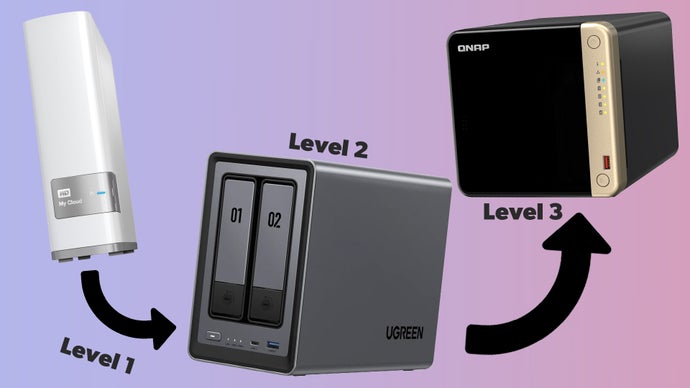
Welcome to Gaming News, where we delve deep into the technologies that enhance your digital life. Today, we’re embarking on an ambitious journey to explore the multifaceted world of Network Attached Storage (NAS). Far from being a single, monolithic solution, a NAS system offers an incredible spectrum of possibilities, catering to everyone from the casual user seeking simple file storage to the dedicated gamer demanding a robust platform for hosting their own game servers, or the media enthusiast building a personal streaming empire. At its heart, the concept is elegantly straightforward: take one or several hard drives and connect them to your local area network, typically via a compact, efficient mini-PC. However, within this broad definition lies a vast ocean of variety. You’ll find dead-basic models that closely resemble a standard external hard drive, offering a straightforward plug-and-play experience. Conversely, there are powerhouse units capable of running a multitude of useful programs, transforming your NAS from a mere storage device into a media server, a game server, an ad-blocking hub, and so much more. We will guide you through the intricacies, empowering you to build your perfect NAS tailored to your exact needs, whether it’s for seamless plug-and-play data backup, a sophisticated multi-drive system for extensive storage, or a dedicated video game server for your gaming community.
Understanding the Core of Network Attached Storage (NAS)
At its most fundamental level, a Network Attached Storage (NAS) device is essentially a dedicated computer designed with a singular purpose: to provide centralized file storage and access over a network. Unlike traditional direct-attached storage (DAS), where drives are connected directly to a single computer via USB or SATA, a NAS connects to your Local Area Network (LAN), making its storage accessible to multiple devices simultaneously. This network connectivity is the key differentiator, enabling shared access for all authorized users and devices on your network.
The underlying architecture of a NAS typically involves specialized hardware and software. The hardware usually comprises a CPU, RAM, network interface, and drive bays to house the hard drives. The software, often referred to as the NAS operating system (OS), is optimized for storage management, network protocols (like SMB/CIFS for Windows, AFP for macOS, and NFS for Linux), and often includes a suite of additional applications and services. This integrated approach ensures efficient data handling, robust security features, and the potential for expanding functionality beyond simple file storage.
The beauty of a NAS lies in its flexibility and scalability. You can start with a single-drive NAS for basic backup needs and gradually expand to multi-drive systems as your data requirements grow. The network interface ensures that access is not limited by physical proximity to a single computer, making it an ideal solution for home users, small businesses, and even larger enterprises.
Navigating the NAS Spectrum: From Simplicity to Sophistication
The NAS market is incredibly diverse, offering solutions that cater to a wide range of technical expertise and functional requirements. Understanding this spectrum is crucial for making an informed decision.
#### Plug-and-Play Simplicity: The Entry-Level NAS Experience
For many users, the primary motivation for a NAS is effortless data backup and centralized file access. Entry-level NAS devices are designed with this in mind, prioritizing ease of use and a streamlined setup process. These units often feature a minimalist design, typically housing one or two drive bays.
The setup process for these devices is remarkably user-friendly. Often, it involves inserting the hard drive(s), connecting the NAS to your router via an Ethernet cable, and then following an on-screen wizard or a web-based interface to complete the configuration. Many manufacturers provide dedicated mobile apps that further simplify setup and management, allowing you to configure your NAS directly from your smartphone or tablet.
Functionality at this level is generally focused on file sharing, automatic backups from computers and mobile devices, and sometimes basic media streaming. They excel at providing a central repository for your photos, documents, and videos, ensuring that your precious data is protected and accessible from any device on your network. These devices are often the perfect introduction to the world of NAS for individuals who may not have extensive IT knowledge but are seeking a more robust and convenient alternative to external hard drives. The simplicity does not compromise the fundamental benefit of networked storage, making it an attractive option for a broad audience.
#### Powerful Multi-Drive Systems: Unleashing Your Data Potential
As your data needs expand, so too does the capability of NAS systems. Multi-drive NAS systems are where the true power and versatility of this technology begin to shine. These devices typically feature four or more drive bays, allowing for significant storage capacity and offering advanced data protection and management features.
The primary advantage of multi-drive NAS systems is the ability to implement Redundant Array of Independent Disks (RAID) configurations. RAID is a data storage virtualization technology that combines multiple physical disk drives into one or more logical units for the purposes of data redundancy, performance improvement, or both. Common RAID levels include:
- RAID 0 (Striping): Data is split across drives, improving performance but offering no redundancy. If one drive fails, all data is lost.
- RAID 1 (Mirroring): Data is duplicated across two drives. If one drive fails, the other continues to function, ensuring data availability.
- RAID 5: Requires at least three drives and offers a balance of performance, capacity, and redundancy. It uses parity data distributed across all drives.
- RAID 6: Similar to RAID 5 but uses double parity, providing even greater protection against drive failures (can tolerate up to two simultaneous drive failures).
- RAID 10 (1+0): Combines mirroring and striping for high performance and redundancy, but requires at least four drives.
The choice of RAID level depends on your priorities: maximum storage capacity, data safety, or read/write speeds. For critical data, implementing a RAID configuration is highly recommended to safeguard against catastrophic data loss due to hard drive failure.
Beyond RAID, multi-drive NAS systems often boast more powerful processors and increased RAM, enabling them to handle more demanding tasks and run a wider array of applications simultaneously. This makes them ideal for users who need to store and manage large media libraries, perform complex backups, or run multiple services from a single device. The expandability of these systems is also a key factor, with many offering the ability to connect additional expansion units to further increase storage capacity.
Beyond Storage: Transforming Your NAS into a Versatile Hub
The evolution of NAS technology has transformed these devices from mere storage repositories into intelligent hubs capable of running a plethora of applications and services. This is where the true potential for personalization and utility comes into play, especially for users with specific needs like media consumption or gaming.
#### The Ultimate Media Server: Streaming Your Content Anywhere
One of the most popular applications for a NAS is its transformation into a powerful media server. Imagine all your movies, TV shows, music, and photos stored in one central location, accessible from any device in your home, or even remotely.
Media server software like Plex Media Server or Emby are commonly installed on NAS devices. These applications organize your media library, fetch metadata (like cover art, cast information, and plot summaries), and transcode media files on the fly to ensure smooth playback on various devices, regardless of their format compatibility. This means you can enjoy your entire media collection on your smart TV, tablet, smartphone, or even a gaming console without worrying about file formats or compatibility issues.
The centralized storage provided by a NAS is crucial for a media server. Instead of having media scattered across multiple computers or external drives, everything is in one place, easily manageable and accessible. Furthermore, with the increasing prevalence of 4K and high-definition content, the storage demands can be substantial, making a multi-drive NAS system with ample capacity a highly desirable solution. The ability to stream content to multiple devices simultaneously is also a significant advantage, allowing different family members to enjoy their preferred entertainment without interruption.
#### Dedicated Video Game Servers: Hosting Your Own Gaming Worlds
For the dedicated gamer and gaming enthusiast, a NAS can be a game-changer when it comes to hosting video game servers. The increasing popularity of cooperative and competitive multiplayer gaming has led many to seek more control and flexibility over their gaming experiences, and a NAS can provide just that.
Certain NAS devices, particularly those with more robust hardware specifications, are capable of running dedicated game server software. This allows you to host private servers for popular games, inviting friends to join your world without the limitations or costs associated with public servers. Games like Minecraft, Valheim, Ark: Survival Evolved, and even more demanding titles can potentially be hosted on a capable NAS.
The key requirements for running a game server on a NAS include:
- Sufficient Processing Power: Game servers can be CPU-intensive, especially with multiple players. A NAS with a powerful multi-core processor is essential.
- Ample RAM: More RAM allows for smoother gameplay and the ability to support more players and in-game entities.
- Fast and Reliable Storage: Solid State Drives (SSDs), either as the primary OS drive or for game server files, can significantly improve loading times and overall server responsiveness.
- Adequate Network Bandwidth: A stable and fast internet connection with sufficient upload speed is critical for a smooth multiplayer experience.
By hosting your own game server, you gain complete control over the game world, including customization options, mod installations, and player management. It eliminates the need for third-party hosting services, which can be costly, and provides a personalized gaming environment for you and your community. This transforms your NAS from a passive storage device into an active gaming platform, offering a unique and rewarding experience for passionate gamers.
#### Other Essential Applications: Ad-Blocking, Surveillance, and More
The utility of a NAS extends far beyond media and gaming. Modern NAS operating systems offer a rich ecosystem of downloadable applications and packages that can significantly enhance your digital life.
Ad-Blocking Servers (e.g., Pi-hole): One highly sought-after application is the ability to run an ad-blocking server like Pi-hole. Pi-hole acts as a DNS sinkhole, filtering out advertisements and trackers at the network level. This means that all devices on your network benefit from ad-blocking, including those that may not have dedicated ad-blocking software installed, such as smart TVs and IoT devices. This not only enhances your browsing experience but also contributes to improved privacy and security.
Network Surveillance (NVR): Many NAS devices support Network Video Recorder (NVR) functionality. This allows you to connect and record footage from IP security cameras directly to your NAS. This provides a centralized and secure location for your surveillance footage, often with advanced features like motion detection recording, remote viewing, and long-term storage.
Cloud Sync and Backup: NAS devices can act as a personal cloud, syncing files with popular cloud storage services like Google Drive, Dropbox, and OneDrive. This offers a convenient way to maintain backups of your important files in both your local NAS and the cloud, providing an extra layer of data protection.
Download Managers: Many NAS units can function as dedicated download clients for torrents or other file-sharing protocols. This allows you to download large files without tying up your primary computer.
Virtualization: More powerful NAS units can even run virtual machines (VMs), allowing you to host other operating systems and applications within your NAS environment. This opens up possibilities for running specialized software or experimenting with different operating systems without affecting your main computer.
The vast array of available applications means that your NAS can be tailored to serve a multitude of purposes, becoming an indispensable part of your home or small office infrastructure.
Choosing the Right NAS: Key Considerations for Your Build
Selecting the ideal NAS solution requires careful consideration of your current needs and future aspirations. Here are the critical factors to evaluate:
#### Drive Bays: Capacity and Scalability
The number of drive bays is perhaps the most fundamental consideration.
- 1-2 Bay NAS: Ideal for basic backup, media storage for a single user, and simple file sharing. Entry-level and budget-friendly.
- 4 Bay NAS: Offers a good balance of capacity and RAID options for redundancy. Suitable for growing families, small businesses, and more extensive media libraries.
- 5+ Bay NAS: For power users, large media collections, heavy virtualization, or demanding game server applications. Provides maximum scalability and RAID flexibility.
Remember that the number of bays dictates the potential storage capacity and the flexibility of RAID configurations.
#### Processor and RAM: Performance for Demanding Tasks
The CPU and RAM are the brains and memory of your NAS.
- Low-end CPUs (e.g., ARM-based): Sufficient for basic file serving, backups, and light media streaming.
- Mid-range CPUs (e.g., Intel Celeron/Pentium): Better for handling multiple applications, more simultaneous users, and basic media transcoding.
- High-end CPUs (e.g., Intel Core i3/i5/i7): Essential for running demanding applications like Plex with multiple transcoding streams, virtual machines, and dedicated game servers.
More RAM generally translates to better multitasking performance and the ability to run more applications concurrently without slowdowns.
#### Network Connectivity: Speed and Reliability
Your NAS’s connection to your network is paramount.
- Gigabit Ethernet: Standard for most modern NAS devices and sufficient for many home users.
- 2.5GbE or 10GbE Ethernet: For users who demand the absolute fastest transfer speeds, especially when working with large files, editing video directly from the NAS, or for high-performance game servers. Ensure your network infrastructure (router, switches, client devices) also supports these speeds.
#### Operating System and Software Ecosystem
The NAS operating system (OS) and the available software packages are crucial for determining the NAS’s functionality and user experience. Look for manufacturers with a robust and regularly updated OS that offers a wide range of user-friendly applications and advanced features. Consider the ease of installation, the intuitiveness of the interface, and the availability of third-party apps for specialized needs.
#### Storage Drives: The Heart of Your NAS
The hard drives you choose are critical for both capacity and reliability.
- NAS-Specific Drives: It is highly recommended to use hard drives specifically designed for NAS environments (e.g., Western Digital Red, Seagate IronWolf). These drives are built for 24/7 operation, are optimized for vibration resistance in multi-drive enclosures, and often come with enhanced error recovery features.
- Capacity: Choose drives that provide the capacity you need now, with room for future expansion.
- RAID Compatibility: Ensure your chosen drives are compatible with the RAID configurations you intend to use.
Building Your NAS: A Step-by-Step Guide
While specific steps vary by manufacturer, the general process of building and setting up a NAS follows a logical progression.
#### Step 1: Hardware Selection and Purchase
Based on your identified needs (capacity, performance, intended applications), select a NAS chassis and the appropriate hard drives. Consider reputable brands known for their reliability and software support.
#### Step 2: Drive Installation
Carefully install the selected hard drives into the NAS chassis. Most NAS units have tool-less drive bays, making this a straightforward process. Ensure the drives are seated correctly and securely.
#### Step 3: Initial Network Connection and Power-Up
Connect the NAS to your router using an Ethernet cable. Plug in the power adapter and turn on the device.
#### Step 4: NAS Operating System Setup
Access the NAS’s web interface from a computer on the same network. This is typically done by entering the NAS’s IP address into your web browser. Follow the on-screen prompts to:
- Initialize the NAS: This often involves formatting the drives.
- Create Storage Pools: Define how your drives will be used, including selecting RAID configurations.
- Create Volumes: Allocate space from the storage pool for data.
- Set up User Accounts and Permissions: Define who can access what data.
- Configure Network Settings: Set a static IP address or ensure DHCP is functioning correctly.
#### Step 5: Install and Configure Applications
Once the basic NAS setup is complete, navigate to the NAS’s app store or package center. Install the applications you need, such as Plex Media Server, Pi-hole, game server software, or cloud sync tools. Configure each application according to its specific requirements.
#### Step 6: Data Migration and Ongoing Management
Begin transferring your existing data to the NAS. Schedule regular backups and familiarize yourself with the NAS’s management interface for ongoing maintenance, software updates, and monitoring.
Conclusion: Your Personalized Digital Sanctuary
Building your perfect NAS is an empowering endeavor that unlocks a world of possibilities. Whether you seek the simplicity of plug-and-play backup, the robust data protection and scalability of powerful multi-drive systems, or the thrill of hosting your own dedicated video game servers, a NAS can be meticulously tailored to your unique requirements. By understanding the core technologies, navigating the diverse product landscape, and carefully considering your needs, you can create a centralized digital sanctuary that not only safeguards your precious data but also enhances your entertainment, productivity, and connectivity. At Gaming News, we believe in empowering our readers with the knowledge to make informed technology choices, and the journey of building a NAS is a testament to the power of personalized digital solutions. Embrace the flexibility, unleash the potential, and build your perfect NAS today.